

All-New Emoji
Google has completely overhauled Android's emoji set, redesigning all 4,000 emojis with a more three-dimensional appearance. The new designs feature depth and shading, replacing the flat, cartoonish versions used since Android 8.0. According to Google's design team, the goal was to make emojis feel more expressive and modern while maintaining clarity at small sizes. The update will arrive first on Pixel phones later this year, with a wider rollout to other Android devices following in early 2027.
This marks the first major emoji redesign since 2021, when Google introduced the blob-style emojis. The change reflects a broader trend in digital communication towards richer, more detailed visual language. Users can expect the new emojis to be available in all apps that use the system emoji font, including WhatsApp, Telegram, and Google Messages.
Pause Point
Pause Point is Google's latest digital wellbeing feature, designed to help users reduce mindless scrolling. When you label an app as 'distracting,' Pause Point triggers a 10-second timer each time you try to open it. During that time, you'll see prompts to do breathing exercises or open a more productive alternative app. You can also set a session timer for how long you want to use the app, and the feature requires a full phone restart to disable, adding friction to discourage impulsive disabling.
This feature builds on previous digital wellbeing tools like Focus Mode and Wind Down, but introduces a more proactive intervention. Early beta testers reported a 30% reduction in time spent on social media apps. It's part of Google's broader push to integrate mental health considerations into the OS, aligning with similar features on iOS and third-party apps like Forest.
Screen Reactions
Screen Reactions simplifies the creation of reaction videos by allowing users to record their selfie camera feed and on-screen content simultaneously. With just a few taps, you can capture your reaction alongside any photo, video, or webpage. The selfie footage appears as a cutout overlay, similar to popular video editing apps. Google says the feature will launch on Pixel phones this summer, with support for more devices later.
This feature taps into the growing trend of reaction content on platforms like YouTube and TikTok. By integrating it directly into the OS, Google eliminates the need for third-party screen recording apps and complex editing. The output is saved as a standard video file, compatible with all major sharing platforms.
Even More AirDrop
Android's Quick Share is expanding its interoperability with Apple's AirDrop. Already available on select Pixel and Galaxy phones, the feature will roll out to devices from Xiaomi, Honor, and OnePlus later this year. Oppo and Vivo previously announced support. For non-compatible phones, Quick Share can now generate a QR code that iPhone users scan to receive files directly to their iCloud storage. Additionally, Google plans to integrate Quick Share into apps like WhatsApp for seamless cross-platform file transfers.
This expansion is a result of ongoing collaboration between Google and Apple to improve cross-platform file sharing. The QR code method works with any iPhone running iOS 16 or later, using iCloud's secure storage infrastructure. Google estimates that the broader rollout will cover over 1 billion Android devices by 2027.
Easier Switching from iPhone
Google and Apple have jointly developed a wireless transfer system for moving data from an iPhone to an Android device. Apple added support for this in iOS 26.3, enabling transfer of files, contacts, messages, home screen layouts, and eSIMs. However, the feature only works with Android 17 devices. Google confirms support will arrive this year, starting with Pixel and Galaxy phones. The process uses a combination of Wi-Fi Direct and cloud services to move data without cables.
This is a significant step in reducing friction for users switching ecosystems. Historically, transferring data from iOS to Android required third-party apps or manual cloud backups. The new system is designed to be as seamless as Apple's own device-to-device migration tool.
Rambler
Rambler is a Gemini Intelligence feature that enhances dictation by removing filler words (like 'um' and 'ah'), condensing speech, and correcting errors in real-time. During a demo, Google showed how Rambler could transcribe a shopping list with changes — when the speaker changed their mind about an item, Rambler automatically omitted it from the final list. It also supports switching between multiple languages within the same message. Rambler will roll out to the latest Samsung Galaxy and Google Pixel phones this summer.
This feature leverages Google's latest language models and is part of a broader suite of AI tools in Android 17. It aims to make voice typing more efficient for both personal and professional use. The multilingual capability is particularly useful for bilingual users who mix languages in conversation.
Create My Widget
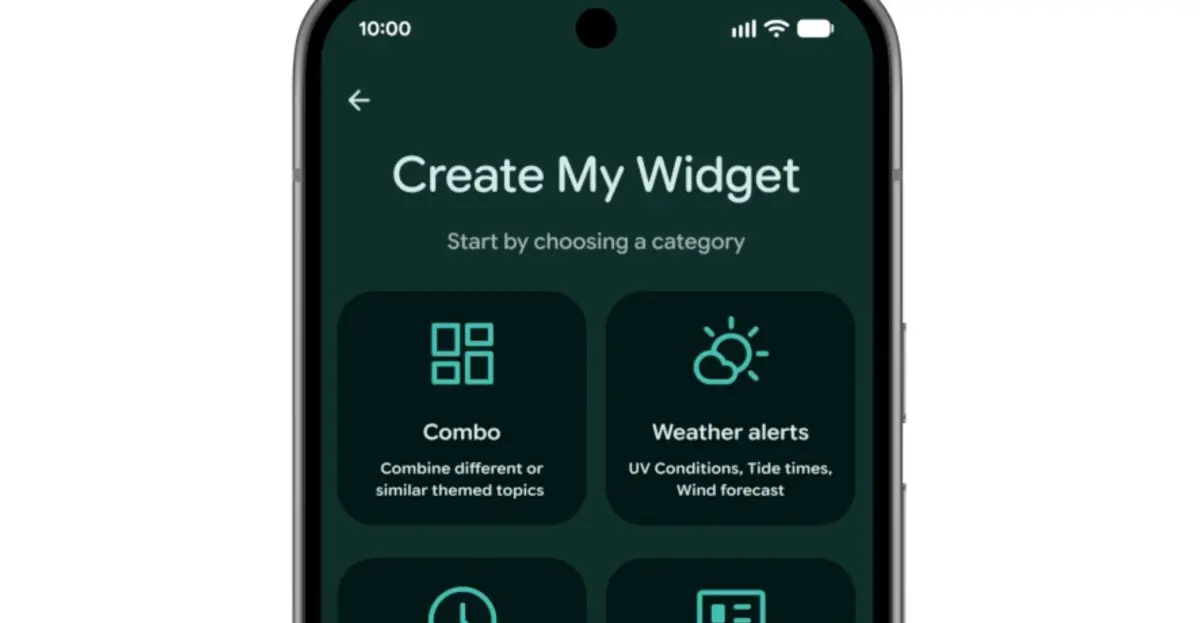
Create My Widget allows users to build custom home screen widgets using natural language prompts. Examples include a meal planner widget that recommends protein-heavy recipes, a weather widget for cyclists prioritizing wind speed and rain, or a live concert feed for a local venue. The feature uses Gemini to interpret the prompt and generate a functional widget. It will be available on select Galaxy and Pixel phones this summer.
This is Google's answer to Nothing's 'Essential App' widgets, but with greater flexibility. Users can specify data sources (e.g., a local news RSS feed or a fitness tracker API) and the widget updates automatically. The generated widgets are fully interactive and can be resized.
Gemini Automation
Android 17 expands Task Automation, which was previously limited to food delivery and rideshare apps on flagship Samsung and Google devices. Now, Gemini can order groceries from a shopping list, plan travel itineraries from photos, and more. Chrome also gets AI upgrades: 'Auto Browse' will launch in late June, allowing the browser to automatically scroll through pages and highlight key information. Gemini also appears in Autofill to help complete forms faster by predicting fields based on context.
These automations are designed to reduce manual steps in common tasks. For example, snapping a photo of a concert poster could trigger Gemini to find ticket availability, check your calendar, and suggest a hotel. The expanded automation will roll out gradually throughout 2026.
More Security Features
Android 17 includes several security improvements. A collaboration with select banks blocks calls that spoof the bank's number, requiring the banking app to be installed. Improved malware detection scans app behavior for suspicious patterns like SMS forwarding or background launches. Chrome's safe browsing mode now scans APK downloads for known malware. Stolen device protections include remote biometric activation via Find Hub and reduced PIN/ password guess attempts with increased wait times between failures.
These features build on Android's existing security model, which includes Google Play Protect and regular security patches. The bank call blocking is similar to initiatives by Truecaller and some carriers, but is integrated natively. The stolen device protections aim to make it harder for thieves to access your data even if they have physical control of your phone.
Google has not yet announced a specific release date for Android 17, but it is expected to start rolling out to Pixel devices in August 2026, with other manufacturers following in the fall. The Gemini Intelligence features will be limited to devices with sufficient hardware capabilities, primarily the latest Snapdragon and Tensor chipsets.
Source: The Verge News